How JavaScript learned to cheat - A Deep Dive into the JS Engine
A deep dive into how JavaScript engines optimize your code with parsing tricks, hidden classes, JIT compilation, and speculative execution.
love it or hate it
JavaScript.
Yeah… the language that runs the web as we know it today.
Beginners love it, people who think they've ascended to some higher plane of programming hate it..
Whatever your opinion on the more successful coffee-named twin is, you can't deny it's a fundamental part of the internet we all have come to love and use.
But behind the façade of being a friendly language that would let you add an integer and an .exe if it could… lies one of the most ingenious execution models ever built for a mainstream language.
The JavaScript Engine.
This is my attempt at slaying that dragon and explaining how JavaScript takes a uniquely clever approach to execution and what makes it different from all the other alternatives.
how javascript runs the internet
You're reading this in a browser right now.
Obvious. No points for that.
But have you wondered what actually happens behind the scenes when you open youtube in your browser and hit play on the 10th Fireship video about how AI will steal your job?
The browser is essentially a container of subsystems - a rendering engine, a networking stack, a memory manager.
And most importantly: the JavaScript Engine.
Chrome uses V8. Firefox uses SpiderMonkey. Safari uses JavaScriptCore.
Running JavaScript means handing your code to this engine.
Now you might say: "Okay but I can use Node. I don't need a browser to run my js code."
Correct - but also not quite. Node.js is a runtime built around V8. It gives JavaScript access to system capabilities outside the browser, but the engine is still doing the heavy lifting.
This engine's job, in theory, is simple:
Convert JavaScript Code into machine instructions the CPU can actually execute.
In practice, this is where things get interesting.
compiled vs interpreted
This isn't a JavaScript-only problem. Every programming language must eventually become machine code. Historically, languages fell into two camps: compiled and interpreted.
Before going further - an analogy. A simple one.
An American businessman visits China to buy a complex machine. He doesn't speak Mandarin. The seller doesn't speak English. So they hire a translator.
Three people. That's the whole setup.
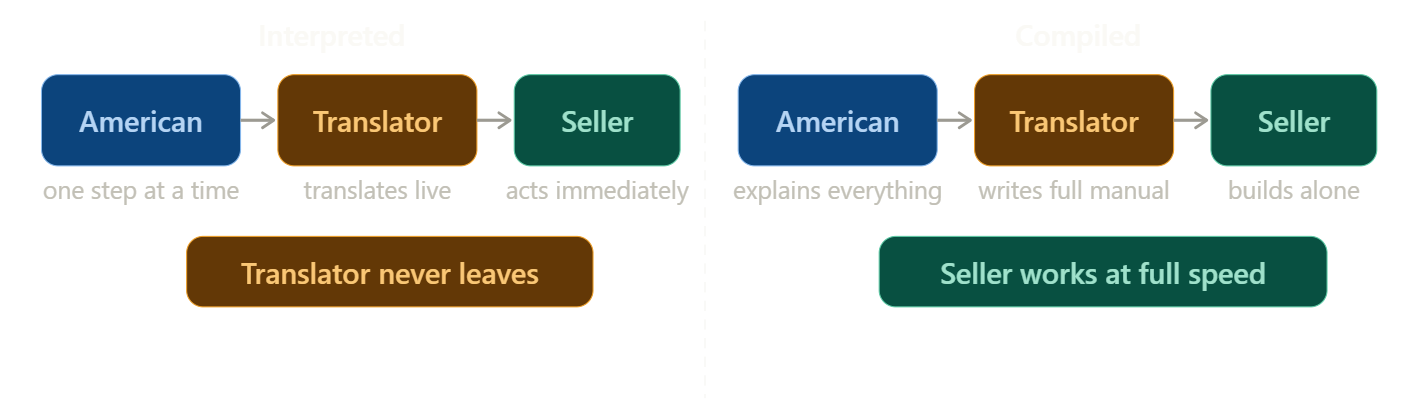
The Interpreted Approach - the American gives one instruction. The translator converts it on the spot, tells the seller, the seller acts. Then the next step. Then the next. The translator never leaves the room. Progress is steady, but every single step goes through him as the machine is slowly built.
The Compiled Approach - the American explains the entire machine upfront. The translator disappears, writes a complete instruction manual in Mandarin, comes back and hands it to the seller. The seller builds the whole thing alone. Slower to start - but once the manual exists, the translator is no longer needed.
how interpretation works
In a purely interpreted system, the engine already contains predefined machine-level instructions for every operation you can write in JavaScript.
Adding numbers → arithmetic instructions.
console.log → output operation.
Function calls → stack manipulation.
The interpreter reads your code line by line. Translates. Executes. Moves on.
The upside: if something breaks, it stops exactly where it fails. Debugging is easy.
The downside: it's slow. Translation and execution happen simultaneously - the engine constantly switches between reading code and running it. Early JavaScript in the 90s suffered heavily from this.
how compilation works
A compiler takes the entire program, translates it all into machine code upfront in an executable binary file, then begins execution. Translation overhead is removed from runtime entirely - making it significantly faster since we don't have to go back and forth on translating and executing.
The catch: errors don't surface the same way. The compiler doesn't stop mid-translation when it hits a problem. You compile, run, then find out something was wrong. Debugging is harder.
The trade-off:
- Interpreted → easier debugging, slower execution
- Compiled → faster execution, harder debugging
JavaScript originally leaned interpreted. Then engines introduced something that changed everything.
what is jit compilation?
JIT (pronounced git with a j but i prefer J-I-T) stands for Just-In-Time Compilation. The idea is simple: don't pick a side. Start interpreted, and upgrade the parts that deserve it.
Back to our analogy.
The translator starts working step by step in real time - like an interpreter. But after a while, he notices something: the American keeps repeating the same three instructions in the same sequence, over and over.
So he writes them down as a shortcut note. Next time those instructions appear, he doesn't translate - he just hands over the note to the shop keeper. Instant.
But then the American changes his request unexpectedly. The shortcut is wrong. Translator throws the note out and goes back to real-time translation.
That's JIT. Start interpreted. Learn what's predictable. Compile the hot parts into fast machine code. Fall back when assumptions break.
The result: you get the error visibility of an interpreter and the execution speed of a compiler - on the code paths that matter most.
how javascript leverages jit -
Now let's follow what actually happens inside the V8 Engine when you run real js code. We'll use a simple function:
function add(a, b) {
  return a + b;
}

add(2, 3);
stage 1 - it's just text
The engine reads the source file into memory. Nothing has executed. No types. No memory layout. Just characters in a string.
stage 2 - lexing
The engine breaks the text into tokens - the smallest meaningful units of the language.
function | add | ( | a | , | b | ) | { | return | a | + | b | }Text turned into grammar…this process is called lexing.
stage 3 - parsing into an AST
Those tokens get transformed into an Abstract Syntax Tree - a structured, hierarchical representation of what the code actually means. The engine now understands the logic, not just the characters.
For our add function, the tree looks like this:
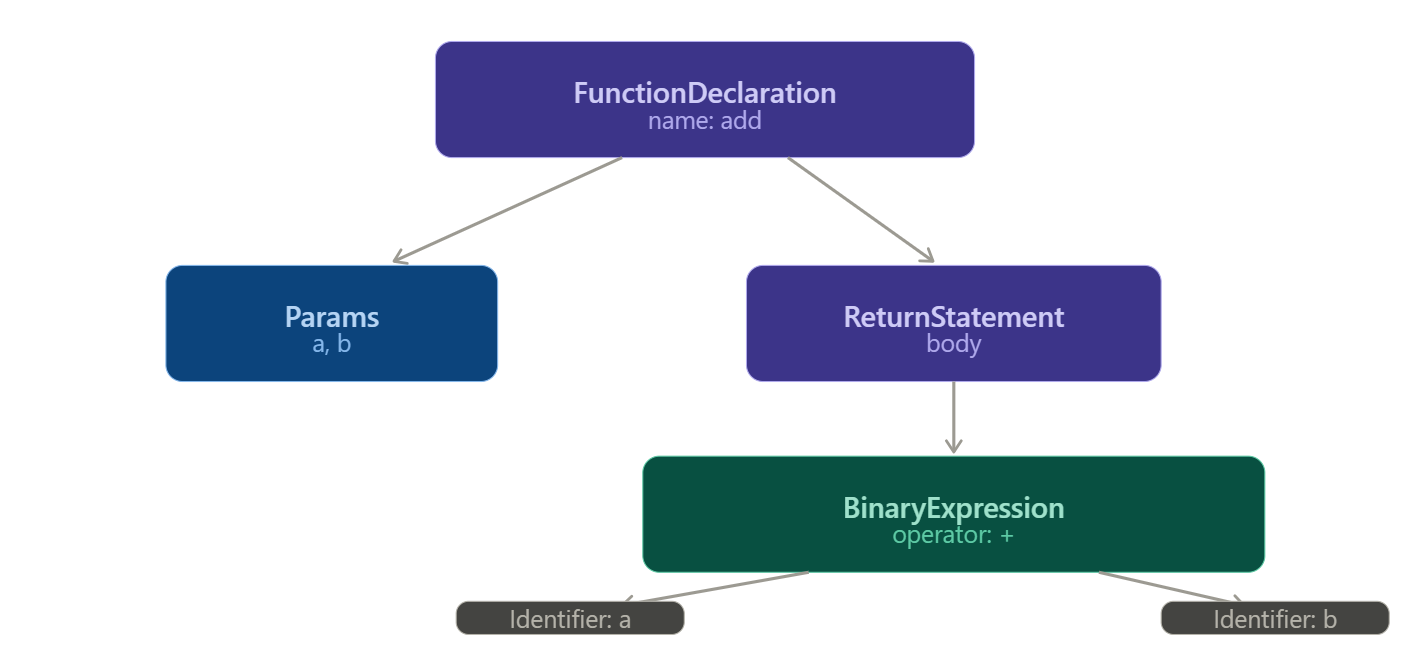
The engine now knows: there's a function called add, it takes two parameters a and b, and its body returns the result of a binary + expression between them. Still not executable - but the structure is fully understood.
stage 4 - AST to bytecode
The engine now compiles the AST into bytecode - a compact instruction format that sits between JavaScript and raw machine code. Lower level than JS, but higher level than what the CPU actually runs.
This is what Ignition - V8's interpreter - actually executes, so this is where code execution on the CPU begins. For our add function, it produces something like:
Ldar a        // load 'a' into the accumulator register
Add  b        // add 'b' to the accumulator
Return        // return the accumulator value
The accumulator is a single register (tiny, fast storage memory within the CPU) that most bytecode operations read from and write to - it keeps the instruction set compact and fast to dispatch. Now the program is executable. Ignition starts running it immediately.
stage 5 - cold execution and profiling
Ignition runs the bytecode instruction by instruction. This is cold execution - no optimization, just get it running.
While it does, V8's profiler watches silently:
add(2, 3);     // call 1 — a: number, b: number
add(7, 1);     // call 2 — a: number, b: number
add(4, 9);     // call 3 — a: number, b: number
               // ... 1,000 times, always numbers
After enough calls with consistent behavior, the profiler marks add as warm - and eventually hot, ('hot' just means the function is being called a lot) That's when the engine decides it's worth spending effort to optimize.
stage 6 - climbing the compiler tiers
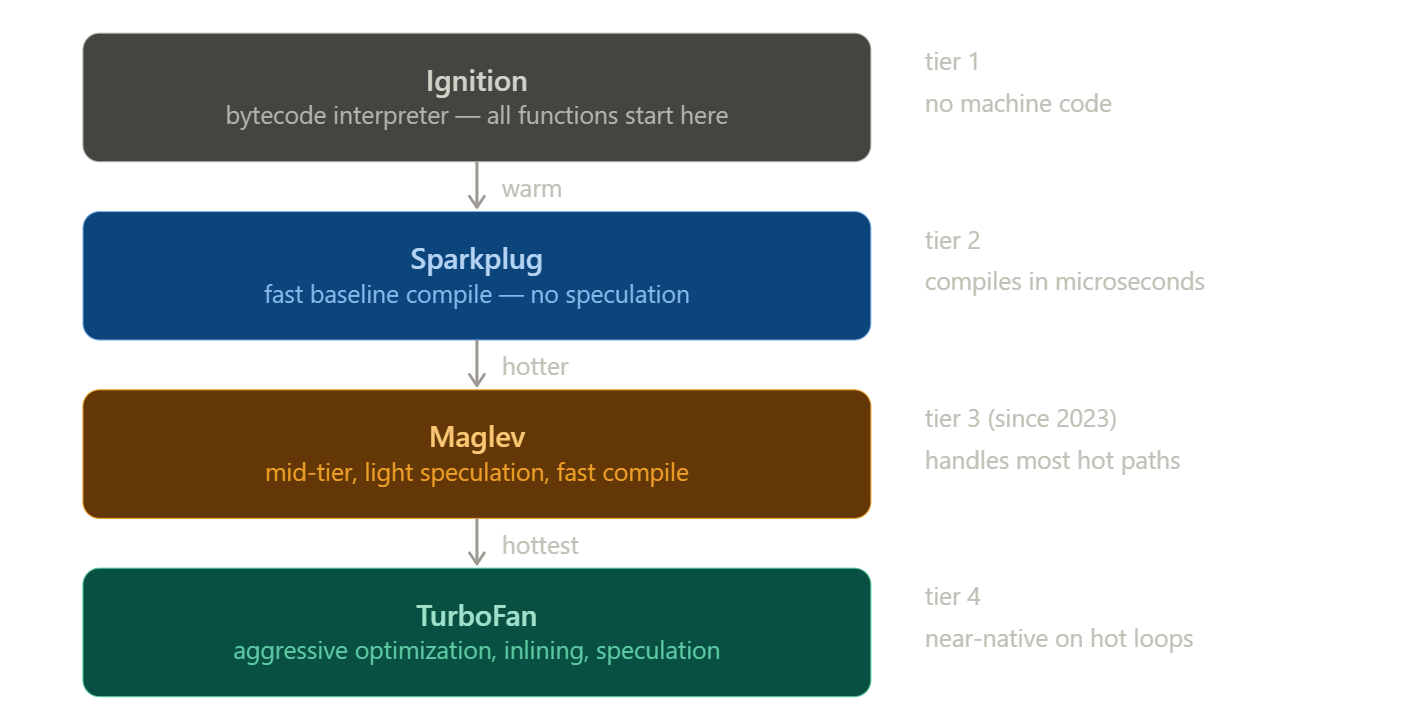
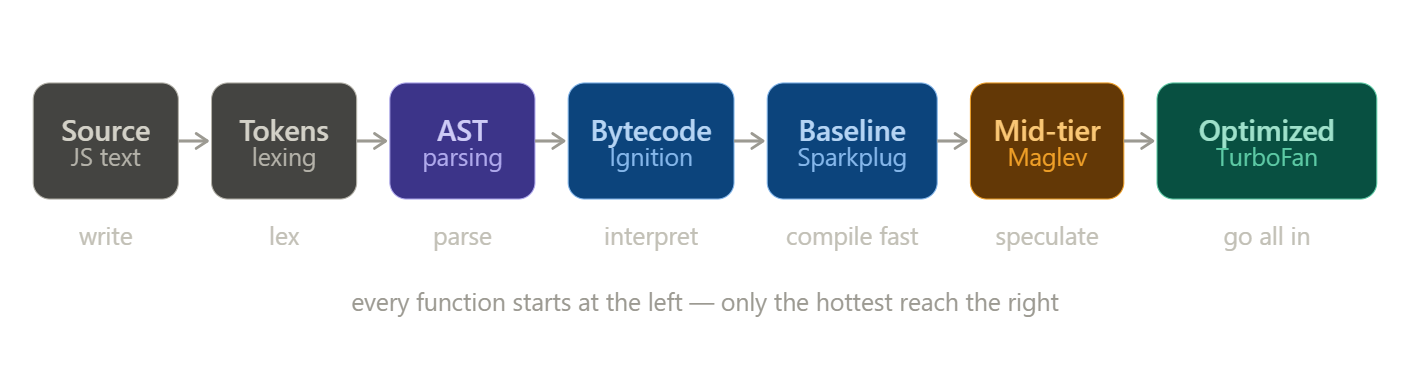
Rather than jumping straight from interpretation to full optimization, V8 uses multiple compiler tiers - each one the right tool for how hot the code actually is.
Think of it as four engineers, each more powerful and more expensive than the last. You only call in the next one when the job genuinely needs them.
Ignition is already running. It's the interpreter - fast to start, no machine code, handles everything cold.
Sparkplug is the first compiler. The moment a function gets warm, Sparkplug translates the bytecode directly into machine code in microseconds. No speculation, no cleverness - just getting off the interpreter fast. Most code lives here.
Maglev is the mid-tier optimizer, introduced in 2023. It starts making bets - if a and b look like numbers, treat them as numbers. Light, fast, good enough for most hot code in a real app. Most hot code lives here.
TurboFan is the heavy hitter. It only fires on functions called tens of thousands of times with rock-solid, consistent behavior, but when it does, it goes all in.
what TurboFan actually does
When TurboFan compiles add, the term "optimized" means specific, concrete things:
Type specialization -
The profiler confirmed a and b are always numbers. TurboFan generates machine code that permanently assumes numbers. No runtime type-checking. Just a direct CPU arithmetic instruction. This is also why tools like TypeScript are popular - they make your types explicit for both humans and the engine's profiler
Inlining -
If add is called inside another function, TurboFan copies the body of add directly into the call site, eliminating function call overhead entirely.
Register allocation -
Instead of reading a and b from memory on each call, TurboFan assigns them directly to CPU registers. Registers are orders of magnitude faster than memory.
Eliminated guards -
Bounds checks and safety guards in the bytecode get stripped out entirely once the profiler has proven they'll always pass.
The end result: instead of Ignition looping through Load a → Add b → Return, the CPU executes:
ADD RAX, RBX   ; add the two register values directly
RET            ; return
Interpreter bypassed entirely. This is why modern JavaScript on tight numeric loops can benchmark close to compiled languages - when TurboFan is confident, the output is genuinely fast machine code.
it's not all sunshine and rainbows
Here's where the JIT's clever trick can backfire.
TurboFan specialized add for numbers. It made a speculation - a bet - that the types would stay consistent. Every optimization rests on that bet.
Now call this:
add("hello", "world");The assumption breaks. The optimized machine code was built for numbers. It has no idea what to do with strings. So V8 deoptimizes - throws out the compiled code, falls back to Ignition, and begins the profiling cycle again from scratch. This is called a deopt.
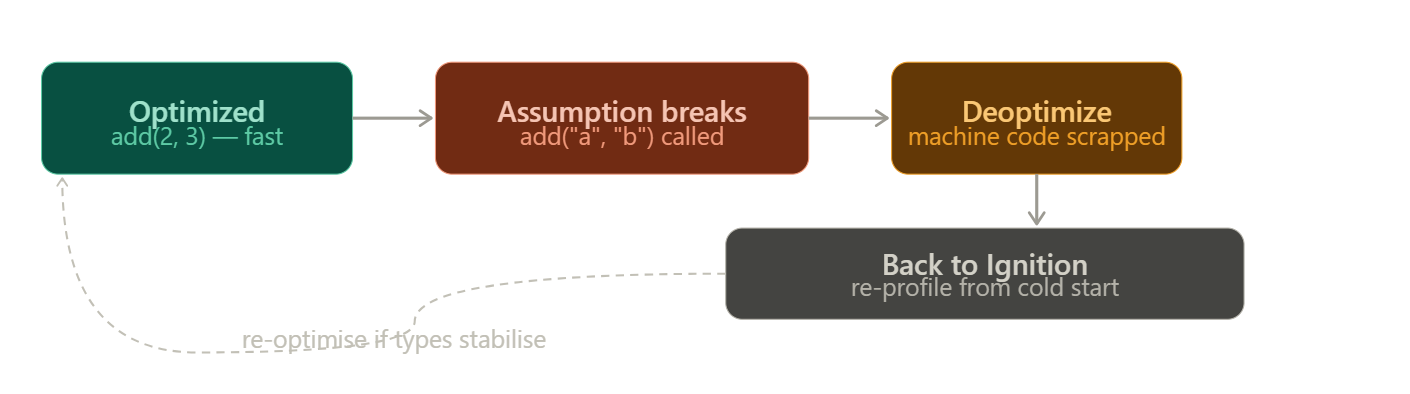
Not all deopts are equal. V8 distinguishes between soft deopts - where the engine retries and may reoptimize - and hard (eager) deopts, where the assumption is so fundamentally broken that V8 marks that code path and refuses to speculate on it again. Repeated deopts on the same function can permanently demote it to a slower tier.
The real danger in production code isn't a single deopt - it's polymorphic and megamorphic call sites. A function that always receives the same types is monomorphic and gets fully optimized. One that receives two or three different type combinations is polymorphic.
TurboFan has to generate code handling multiple cases. One that receives many different types is megamorphic - TurboFan gives up entirely and falls back to a generic, slow path that doesn't get optimized at all.
In hot loops, the difference between mono and megamorphic dispatch is measurable.
You can actually observe this in your own code. Running Node.js with --trace-opt --trace-deopt prints every optimization and bailout to the console with the exact reason - things like "Insufficient type feedback for call" or "Wrong map".
In Chrome, the Performance tab's flame chart surfaces deoptimization events directly, showing you exactly which functions bailed and why. If you're debugging a performance problem in a hot path, this is where you start.
writing JIT-friendly code
The engine makes educated guesses about your behavior. Your job, if you care about performance, is to be predictable.
Don't change types mid-flight.
If a variable starts as a number, keep it a number. Switching between numbers, strings, null, or objects forces TurboFan to abandon its specializations and generate slower, generic code for every call.
Keep object shapes consistent.
V8 tracks something called a hidden class - essentially the shape of an object, recording which properties it has and in what order they were added. Objects with the same shape share a hidden class, and property lookups are fast because V8 knows the exact memory offset of each property.
When you add properties dynamically or in different orders, V8 must create a new hidden class every time - building a transition tree of shapes that grows more expensive to traverse.
Worse, using delete on a property or adding properties randomly can push an object into dictionary mode - where property storage falls back to a hash table instead of a fixed-offset struct. Dictionary mode property lookups are 2–10x slower than hidden-class lookups. The fix is simple: always initialize objects the same way, in the same order, with the same properties.
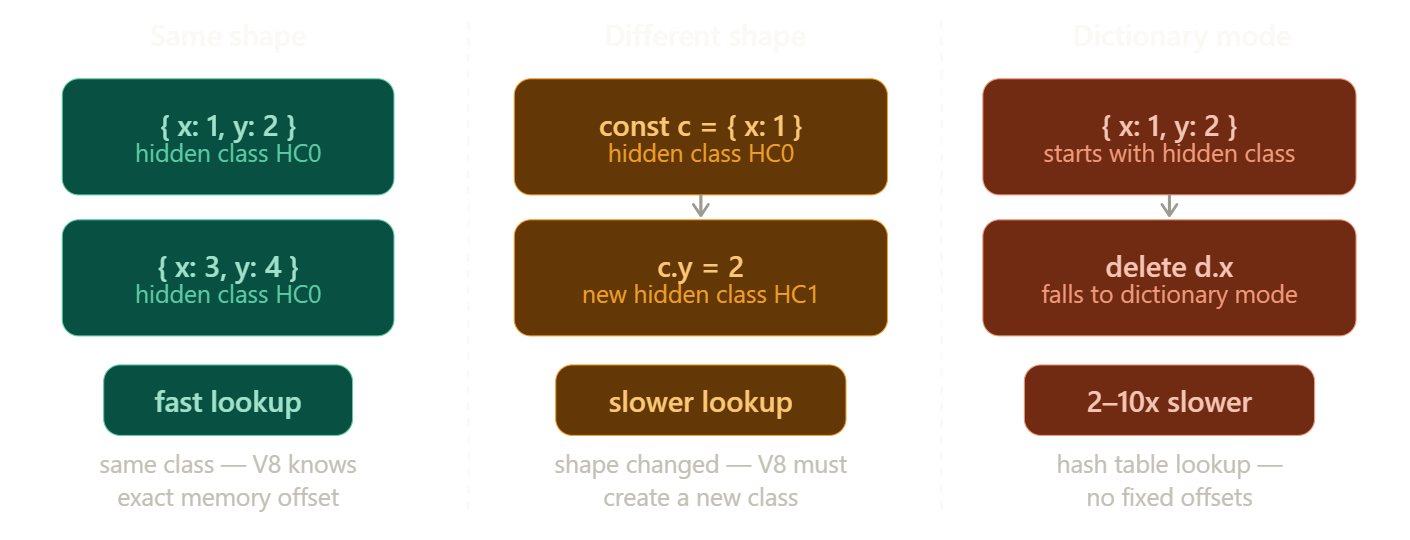
// same shape every time - fast, single hidden class
const a = { x: 1, y: 2 };
const b = { x: 3, y: 4 };

// different shapes - slow, creates new hidden classes
const c = { x: 1 };
c.y = 2;          // shape changed after creation

// dictionary mode - slowest
const d = { x: 1, y: 2 };
delete d.x;       // V8 falls back to hash table storage
Avoid polymorphic call sites
A function that always receives the same types is monomorphic - TurboFan optimizes it aggressively.
Two or three type combinations → polymorphic, slower.
Many type combinations → megamorphic, no optimization at all.
the cleanup crew
All this execution is piling up memory.
Every object you create, every closure you form, every function call you make - it all lives on the heap. V8's garbage collector periodically identifies objects that are no longer reachable from your code, frees their memory, and compacts the heap.
V8 uses a generational garbage collector. The core insight is that most objects die young - a temporary variable inside a function, an intermediate result in a chain. Short-lived objects live in a space called the young generation and are collected very frequently and cheaply. Objects that survive long enough get promoted to the old generation and collected less often.
The GC is mostly invisible in normal code. But hold references you don't need - closures capturing large objects, event listeners never removed, caches that grow without bound - and memory grows. In long-running applications, this is where subtle performance problems quietly compound.
one more thing
V8 doesn't only run JavaScript. It also runs WebAssembly - a binary instruction format that compiles from languages like C, C++, and Rust. Wasm skips the JavaScript pipeline entirely: no parsing, no JIT warm-up, no speculation. It arrives at V8 as typed, compact bytecode that compiles directly to optimized machine code. Same engine. Completely different entry point…
More on Webassembly soon as I go through how I wrote my own custom language and compiled it to Webassembly… If that blog is out by the time you read it you'll find the link attached below..
that's the engine
Text → tokens → AST → bytecode → interpreted by Ignition → baseline-compiled by Sparkplug → mid-tier optimized by Maglev → fully compiled by TurboFan for the hottest paths - and occasionally deoptimized and rebuilt when reality doesn't match the bet.
It's a system that begins cautiously, learns from what it sees, takes calculated risks, and adapts when those risks fail. What started as Mocha, a ten-day prototype in 1995, has over three decades grown into one of the most deeply embedded technologies in modern computing. Today, if a device can run a browser, it's almost certainly running JavaScript.
If you made it this far, I hope this deep dive gave you a clearer mental model and was as engaging to read as it was to write. Until next time.